I find a lot of small business owners are sitting in the same place when it comes to AI: they know AI tools exist, they know these tools should save time, but when they sit down to use them the results feel generic and useless. They move on to try another tool or give up altogether.
The issue is not the AI. The issue is the AI knows nothing about you.
I learned this the hard way when I first started using these tools. I would ask an AI assistant to draft a client email, and it would come back with something I would never send. Wrong tone. Wrong priorities. Wrong everything. I spent more time fixing the output than I saved generating it.
Then I built what I now call a preference document. Everything changed.

What is a Preference Document?
A preference document captures your decision-making rules in writing. It tells any AI tool, or any human assistant for that matter, how you think about recurring situations.
This is not a goals statement or a mission document. Those are aspirational. A preference document is operational. It answers the question: when situation X happens, what do I do?
Here is a simple example from my own document:
Scheduling preferences:
- No meetings before 9am
- No meetings on Fridays
- Client calls take priority over internal meetings
- Maximum 4 hours of meetings per day
- 15-minute buffer between all appointments
When I feed this to an AI scheduling assistant, it stops suggesting 7am calls. It stops booking me solid for 8 hours straight. It makes decisions the way I would make them.

Why Kansas Business Owners Need This More Than Most
I have worked with hundreds of small businesses across Kansas since starting this business in 2017. The pattern is consistent. Owners wear every hat in the company. They handle sales, operations, bookkeeping, and customer service themselves.
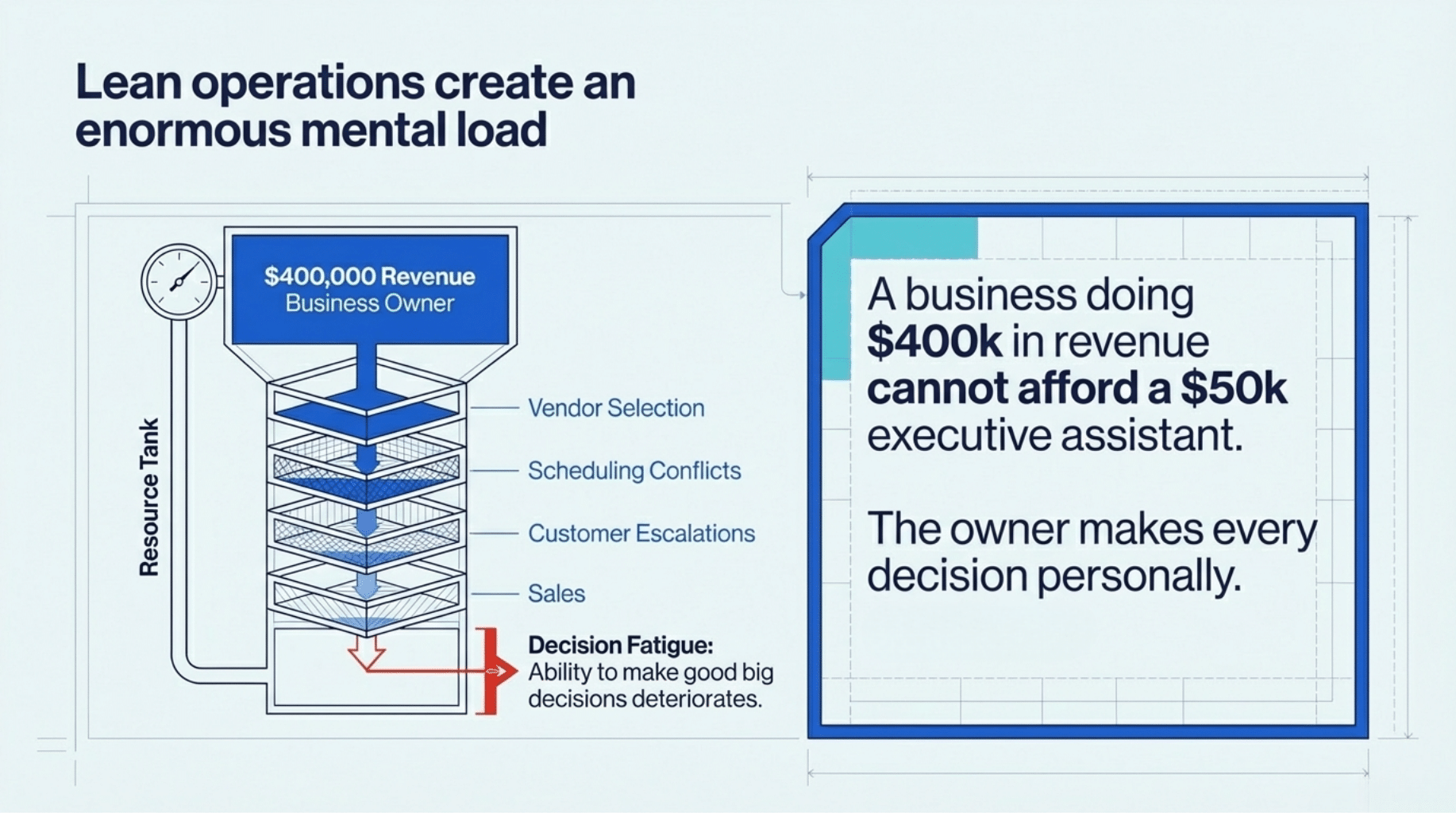
To be clear, I don’t think this is laziness or stubbornness. It’s just economics. A business doing $400,000 in annual revenue does not have budget for a $50,000 executive assistant. So the owner makes every decision personally. Every vendor selection. Every scheduling conflict. Every customer complaint escalation.
The mental load is enormous. Research from the American Psychological Association shows decision fatigue is real. After making hundreds of small decisions, your ability to make good big decisions deteriorates.
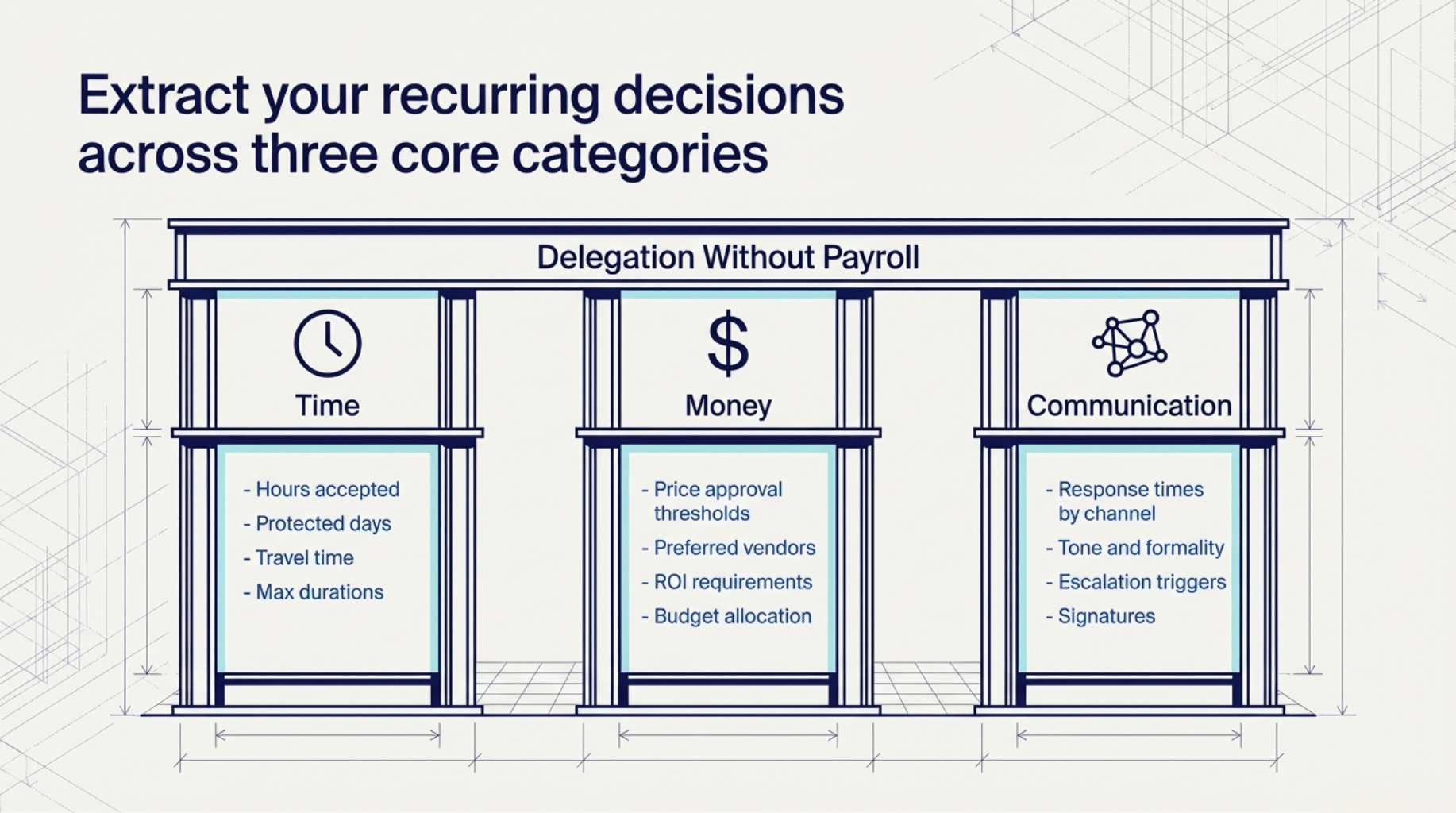
A preference document paired with AI tools gives you delegation without payroll. You get the benefits of having staff handle logistics while keeping your overhead low.
Building Your First Preference Document
Start with three categories: time, money, and communication.
Time preferences cover scheduling, deadlines, and availability. Write down your rules for:
- Hours you accept meetings
- Days you protect for focused work
- How far in advance you need notice for commitments
- Travel time requirements between appointments
- Maximum duration for different meeting types
Money preferences cover vendor selection, purchasing, and budgeting. Document your rules for:
- Price thresholds that require your personal approval
- Preferred vendors for common purchases
- Payment terms you accept and offer
- Budget allocation across categories
- ROI requirements for investments
Communication preferences cover how you interact with clients, vendors, and team members. Write down:
- Response time expectations by channel (email, phone, text)
- Tone and formality level for different audiences
- Information you always include or exclude
- Escalation triggers that require your direct involvement
- Signature lines and sign-offs you use
Be specific. “I prefer morning meetings” is useless. “Meetings between 9am and 11am Central, Tuesday through Thursday” gives an AI tool something to work with.
A Real Example from Our Operations
At Wildman, we handle dozens of client requests weekly. Before the preference document, I reviewed every proposal personally. Now our AI assistant drafts proposals using these documented rules:
Project pricing rules:
- Website projects minimum $2,500
- AI implementation projects minimum $2,500
- Rush fee of 25% for deadlines under 2 weeks
- Retainer clients receive 10% discount
- No payment plans under $10,000 total
Proposal communication rules:
- Lead with the business outcome, not the technical deliverable
- Include timeline with specific dates
- List exactly what is included and what is not
- Close with clear next step and deadline for response
The AI generates a first draft in 30 seconds. I review it in 2 minutes. The draft needs usually needs minor adjustments and will require larger adjustments about 20% of the time. The old process took me at least 45 minutes per proposal.
Multiply that savings across 15 proposals per month. I recovered about 10 hours of monthly capacity. Those hours now go toward revenue-generating client work.
Where This Works Best
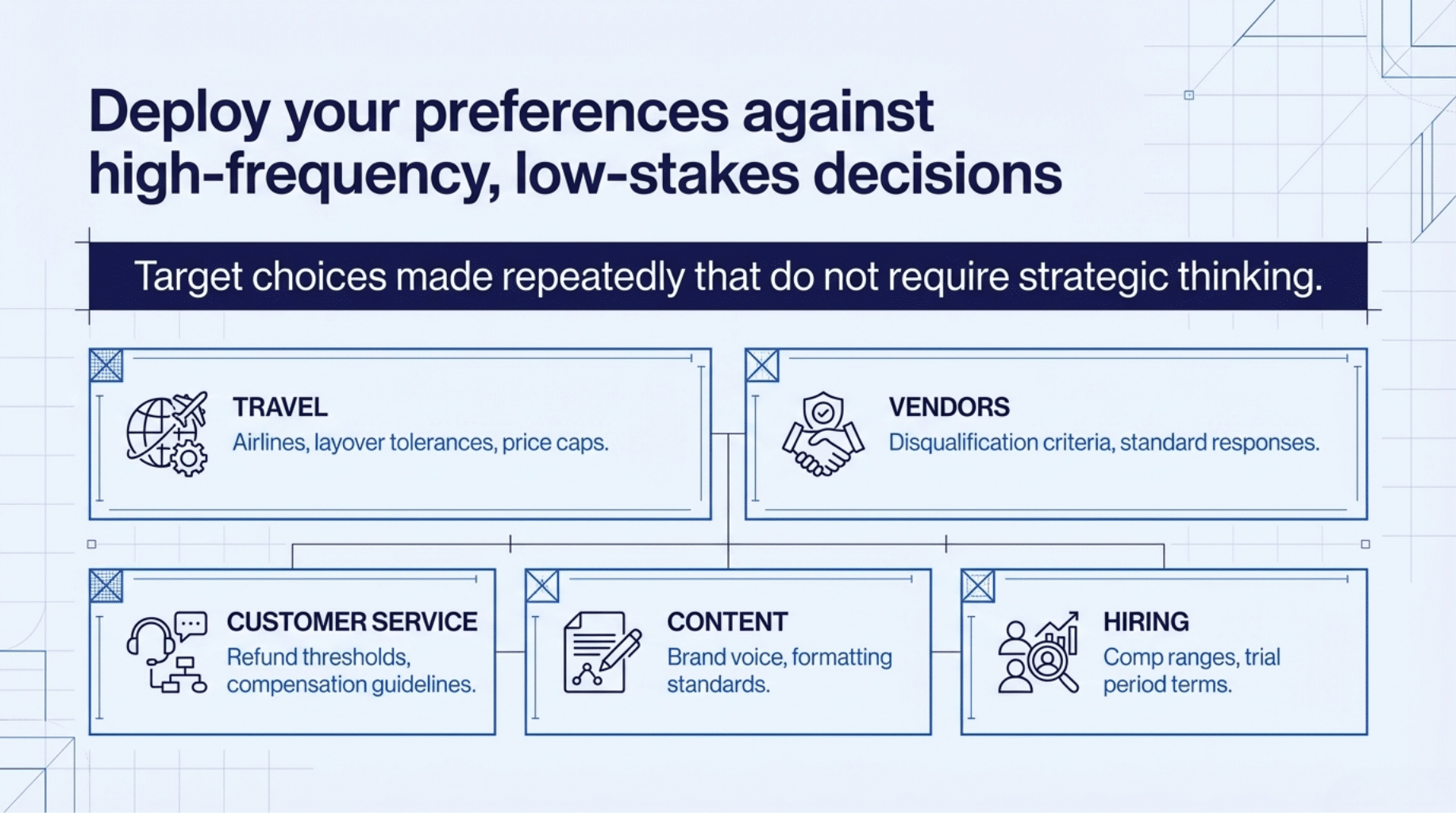
Preference documents create the most value in high-frequency, low-stakes decisions. These are choices you make repeatedly that do not require strategic thinking each time.
Kansas small business owners I work with have found success applying preference documents to:
Travel booking: Preferred airlines, seat positions, hotel chains, rental car companies, maximum prices by trip type, layover tolerances, departure time windows.
Vendor communication: Standard responses to sales pitches, information required before taking a meeting, automatic disqualification criteria, preferred contact methods.
Customer service: Response templates by issue type, refund thresholds, escalation triggers, compensation guidelines, follow-up timing.
Content creation: Brand voice guidelines, topics to cover and avoid, formatting standards, call-to-action preferences, approval requirements.
Hiring and contractors: Required qualifications, compensation ranges, interview process steps, reference check requirements, trial period terms.
Each category you document removes decisions from your daily plate.
The Technical Implementation
You do not need expensive software. A simple text file works with most AI assistants.
Create a document in plain text, Google Docs, or Notion. Organize it by category with clear headers. Use bullet points for individual rules. Keep language direct and unambiguous.
When using ChatGPT, Claude, or similar tools, paste the relevant section at the start of your conversation. Tell the AI to reference those preferences when completing your request.
For example: “Using the scheduling preferences below, suggest three meeting times for a 30-minute call with a prospect in the Kansas City area. [Paste preferences here]”
The AI now has context. Its suggestions will align with how you operate.
Some tools let you save these preferences permanently. Custom GPTs in ChatGPT allow you to embed instructions that persist across conversations. Claude has projects. Other platforms offer similar features.
Documents like these can really empower AI Agents too! I cover Agents in more depth in other articles but it’s worth mentioning here for more advanced users.
Maintaining Your Document
Your preferences will change. Review your document quarterly.
Look for rules that no longer serve you. Look for new decisions you make repeatedly that should be documented. Look for places where the AI suggestions consistently miss the mark, which indicates unclear or incomplete rules.
I update mine at the start of each quarter. It takes 20 minutes and saves hours of accumulated friction over the following months.
Start Today
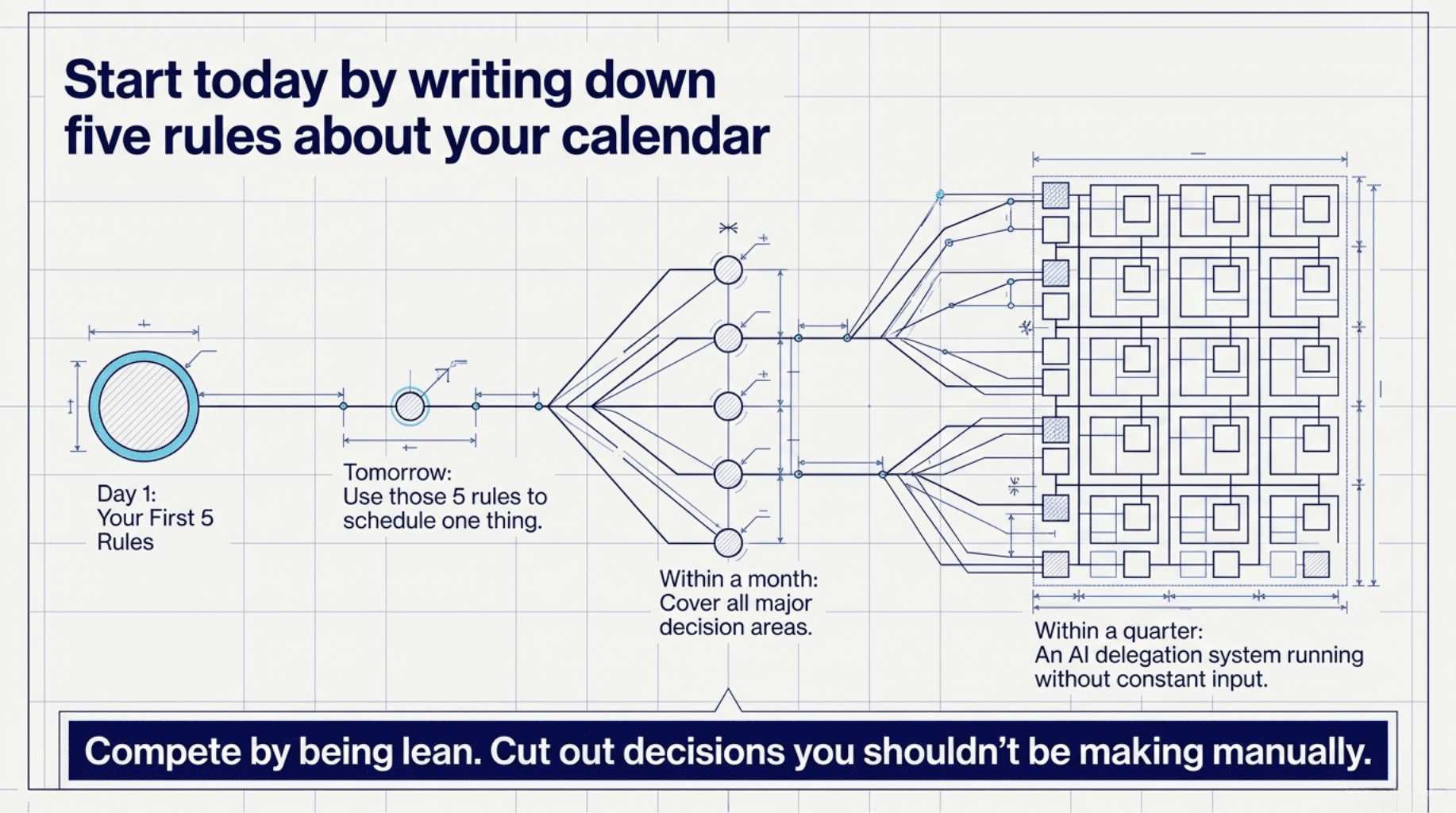
Open a new document right now. Write down five rules about how you handle your calendar. Be specific about days, times, and conditions.
Tomorrow, use those rules with an AI assistant to schedule something. See how much closer the suggestions match your actual preferences compared to generic recommendations.
Then add five rules about another category. Build momentum.
Within a month, you will have a working preference document covering your major decision areas. Within a quarter, you will have an AI delegation system that runs without constant input from you.
Kansas small businesses compete with the coasts by being lean. This makes you leaner. Not by cutting corners, but by cutting out decisions you should not be making manually in the first place and allowing you to scale your capacity like you couldn’t before.