Get A2P Approval Faster with AI Assistance
 Wildman Web Solutions

Catch A2P submission errors before you submit, with help from the new AI assistant inside the A2P registration flow.
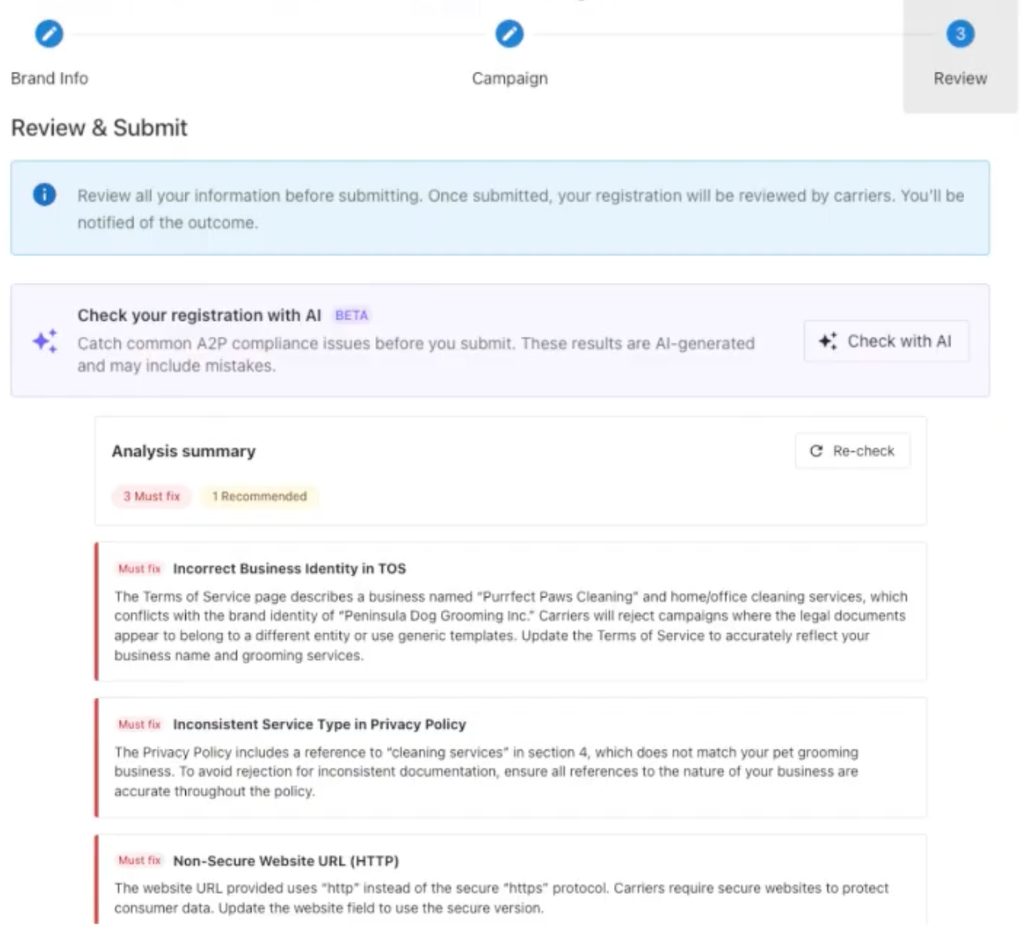
AI-powered A2P Assistance
A2P rejections are time consuming and frustrating, especially when it’s unclear what’s causing the rejection.
A new button inside the A2P flow triggers an AI assistant that analyzes a business’ submission and flags what needs to be fixed, drawing on a scan of the business’ website and terms of service.
Businesses working toward SMS registration can run it after every change until their submission comes back clean, rather than guessing at why a prior attempt was rejected.
Why It Matters
A2P submissions were being rejected and resubmitted without changes, because it wasn’t clear what was actually wrong. This assistant gives you a specific, actionable answer instead of a rejection notice, which should raise first-pass approval rates and cut down on repeat failed submissions.
How To Get Started
- Open the A2P registration flow for the business you’re registering.
- Click the new “Check with AI” button to analyze the current submission.
- Review the flagged issues. The assistant scans the submission along with the business’ website and terms.
- Make the suggested changes and re-run “Check with AI” before resubmitting, repeating until the submission comes back clean.
FAQs
Q: Does running the assistant replace submitting the A2P form?
A: No, it’s a pre-check. You still submit through the normal A2P flow, the assistant just tells you what to fix first.
Q: What does the assistant actually check?
A: It scans the business’s submission along with their website and terms of service for common rejection causes.