A CRM that keeps itself up to date.
An AI CRM assistant that updates contact records, deal notes, and follow-up tasks after every interaction — and answers any question about your pipeline in plain English.
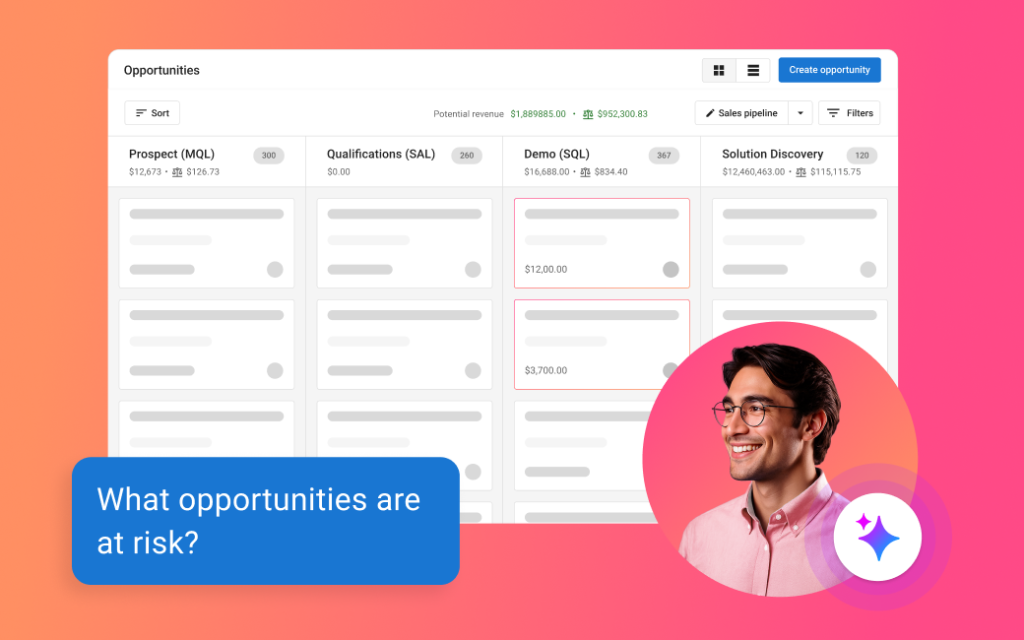
What CRM AI does
After every call, meeting, or email, contact and deal records update themselves. Data entry handles itself.
“Which deals are at risk?” “Who haven’t I followed up with?” Ask in plain English and get instant answers.
AI transcribes your sales meetings, writes the summary, and scores every conversation for coaching.
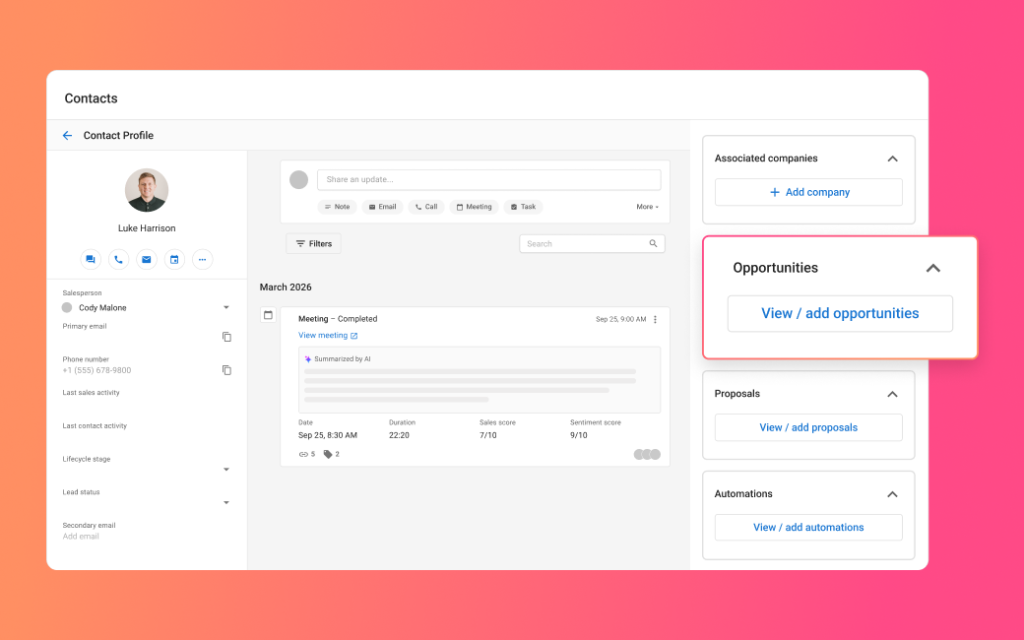
Grow revenue without adding headcount.
- Drag-and-drop deal board with values, close dates, and health scores
- Meeting recording, transcription, and summaries saved to the record
- Conversation scoring that highlights coachable moments
- No per-seat pricing — your whole team is included
What is an AI CRM assistant?
An AI CRM assistant is software that keeps your customer records current on its own. Rather than a rep typing up what happened after a call, the assistant reads the sales activity, extracts the outcome, and writes it into the contact, company, and opportunity records itself.
CRM AI is our version of that. It is a full CRM — contacts, companies, opportunities, pipelines, lists, forms, tasks, and meeting scheduling — with an AI Sales Assistant built into the middle of it rather than sold as a bolt-on. The assistant does two jobs: it updates records from what your team actually did, and it answers questions about your pipeline when you ask them in plain language.
The distinction that matters is where the work goes. A traditional CRM is a filing cabinet that only knows what somebody remembered to file. An AI CRM assistant fills the cabinet as a by-product of the selling you were already doing.
How does CRM AI update itself after a call or meeting?
It reads the meeting. CRM AI records and transcribes your virtual sales meetings, identifies who was on the call and what was agreed, then writes the summary, the action items, and the updated field values straight onto the contact, company, and opportunity records. Nobody has to type it up afterwards.
Meeting capture works natively with Google Meet, with ad-hoc recording on Microsoft Teams, and transcription is English at present. Beyond recorded meetings, the assistant also updates records from ordinary sales activity — logged calls, emails, tasks, and pipeline movement — so records stay current on deals that never involve a video call at all.
What lands on the record is a written summary, a bulleted list of next steps, and the field updates already applied. The follow-up is faster to send because the notes are already sitting there, and the deal that goes quiet is usually the one nobody wrote up.
Can AI research and fill in CRM fields from the web?
Not in CRM AI, and that is a deliberate choice. The assistant populates fields from your own sales activity — meetings, calls, emails, and tasks — rather than scraping public sources and inferring the rest. Everything it writes onto a record traces back to something that actually happened between your business and that customer.
That is a genuine trade-off and worth stating plainly. Tools that enrich records from the web will fill a blank company profile faster than any human can. They also introduce data nobody on your team has verified, which is how a CRM ends up confidently wrong: the headcount from two years ago, a job title from three roles back, a direct line that was never answered.
Our position is that external enrichment belongs in a separate, reviewable step rather than mixed silently into the same fields your reps are about to quote back to a customer. If you want that step, it is something we build as part of an AI project rather than something the CRM should do behind your back.
What can you ask your pipeline in plain English?
Anything you would otherwise have built a report to answer. You chat with your CRM data the way you would ask a sales manager: “What happened in my last meeting with Joe?”, “What opportunities have we opened with Acme Corp?”, “Who have I not followed up with this month?” The answer comes back in seconds, drawn from your own records rather than from a general-purpose model's guesswork.
This removes the two things that quietly eat a sales week: hunting through records to prepare for a call, and assembling a report to answer a question somebody could have asked out loud.
It also changes who can get answers. Building a filtered report is a skill; asking a question is not. Owners who never learned the reporting screens in their last CRM tend to use this one, and a CRM the owner actually opens is a CRM the team keeps current.
How is this different from a regular CRM?
A regular CRM stores whatever your team types into it. CRM AI writes most of that for you and lets you interrogate it in conversation. The failure that kills most small-business CRM rollouts is not a missing feature — it is that adoption slips, the data goes stale, and within a quarter the reporting is fiction. That is an admin problem, and this removes most of the admin.
A lot of software calls a saved-reply template “AI”, so it is worth being specific about what is genuinely automated here, and we have written before about how much of that labeling is marketing.
Three things are actually done by AI: extracting outcomes from meetings and writing them to records, answering natural-language questions about your data, and scoring conversations for coaching. Everything else — pipelines, tasks, web forms, lists, custom objects — is ordinary CRM function, done properly.
How does CRM AI coach a sales team?
It scores every recorded conversation and tells you what to work on. CRM AI analyzes each call for sentiment, patience, and how much the prospect actually spoke, scores it against recognized qualification frameworks such as BANT, MEDDPICC, and Sandler, then surfaces coachable moments, unaddressed pain points, and missed openings.
For a small team this is the hardest capability to buy any other way. Coaching normally needs a manager with the time to sit in on calls, and in a business where the manager is also selling, that time does not exist. Here every call is reviewed, and the manager reads the exceptions instead of listening to the recordings.
It is also how a new hire gets up to speed without shadowing somebody for a quarter. They can see, call by call, where their conversations diverge from the ones that close.
Who is CRM AI for?
Small and mid-sized teams who sell through conversations and lose deals to follow-up rather than to price. If your business runs on quotes, site visits, consultations, or discovery calls, and the usual reason a deal goes cold is that nobody circled back, this is aimed squarely at you.
It fits particularly well where everybody sells part-time. Owners, estimators, and service managers rarely keep a CRM current, because updating it competes directly with doing the job they were hired for. When the record updates itself, that objection disappears — and so does the argument about whose job the data entry is.
It is a weaker fit for high-volume transactional ecommerce, where the signal is in cart behavior rather than conversations, and for teams already deep inside an enterprise CRM with heavy custom development they are not ready to unwind.
What does CRM AI cost?
It is priced per organization rather than per seat, with unlimited users included. That is the structural difference from the CRMs most small businesses have tried and quietly abandoned: adding somebody to the team does not add to the bill, so nobody gets left out of the system to keep the license count down.
Everything on this page is included: the CRM itself — contacts, companies, opportunities and pipelines, lists, web forms, tasks, meeting scheduling and custom objects — plus the AI Sales Assistant, meeting recording and transcription, conversation intelligence, and sales coaching with methodology scoring.
We quote after a short conversation rather than from a price list, because what the setup involves depends on where your contact data lives now and how your pipeline is shaped.
How do we start?
A short call and a look at what you use now. We map your current pipeline stages, the fields you genuinely rely on, and where your contact data lives today, then configure CRM AI to match — including any custom objects your industry needs, whether that is equipment, properties, vehicles, or job sites.
CRM AI is one of five products in the Business Platform, and it is strongest sitting next to Conversations AI, which answers your calls, texts, and web chats around the clock and drops every new contact straight into the CRM. Between them, the lead gets captured and the record gets written without anybody typing.
If you would rather have the whole thing built, connected, and run for you instead of running it yourself, that is what our AI Solutions engagements are for. Either way, book a call and we will map the right setup for your situation.
How does CRM AI compare to HubSpot and Salesforce?
HubSpot and Salesforce are larger products with deeper ecosystems, built for organizations with heavy custom development, a large app marketplace and a dedicated sales-operations team to run it. CRM AI is built for the far more common case — a small team that needs the CRM to stay accurate without anybody maintaining it.
The comparison below is about structure rather than feature counts, and reflects how these products were packaged as of August 2026. Prices in this category change constantly; pricing models change very rarely, and the pricing model is what decides whether your whole team ends up in the system or only the people you could justify a license for.
| What you are comparing | CRM AI | HubSpot or Salesforce, typically |
|---|---|---|
| How it is priced | Per organization, with unlimited users included | Per user, per month, so the bill grows with the team |
| Keeping records current | The AI Sales Assistant writes records from meetings and sales activity | Manual entry, or automation available on a higher tier |
| Asking questions of your data | Chat with the CRM in plain English | Reports and dashboards you build, or a paid AI add-on |
| Meeting recording and summaries | Built in, natively for Google Meet and Microsoft Teams | Usually a higher tier, an add-on, or a separate tool |
| Call scoring and sales coaching | Included, scored against BANT, MEDDPICC and Sandler | Add-on or third-party product in most configurations |
| Fitting it to your industry | Custom objects and fields, configured with you at setup | Extensive, but often needs a partner or a developer |
| Who sets it up and runs it | We configure it with you and stay on afterwards | Self-serve, or a paid implementation partner |
| Where it fits best | Small teams selling through conversations | Large sales organizations with dedicated operations staff |
CRM AI: common questions
Does CRM AI replace my current CRM, or run alongside it?
It replaces it. CRM AI is a full CRM in its own right — contacts, companies, opportunities, pipelines, lists, tasks and web forms — rather than a layer that sits on top of something else. We migrate your existing contacts and companies during setup and map your current pipeline stages, so the board looks familiar on day one.
Running two CRMs in parallel is the one configuration we advise against. The records diverge within weeks, and after that neither one is the version anybody trusts.
Which meeting platforms can CRM AI record?
Google Meet natively, and Microsoft Teams through ad-hoc recording. Transcription is English at present, and support for further meeting platforms and for capturing audio notes is on the roadmap.
If your sales conversations happen on the phone or in person rather than on video, the assistant still keeps records current from logged activity. There will simply be no recordings for the conversation intelligence and coaching to work from, which is worth knowing before you count on that part.
Who can see meeting recordings, transcripts and AI summaries?
Whoever you decide. CRM AI carries permission settings that control access to recordings, transcripts and AI-generated summaries separately from the rest of the record, so a rep can review their own calls without the whole team listening in.
We configure these during onboarding rather than leaving the defaults in place, because recorded sales conversations are the most sensitive material most small businesses will ever put into software. Check your own state’s rules on recording consent as well — they vary, and the requirement is not the same everywhere.
Can CRM AI capture leads from my website?
Yes. CRM AI includes web forms that drop submissions straight into the CRM as contacts, with no export step and no separate form tool to reconcile afterwards. An inquiry arrives already attached to a record, ready for a task or a pipeline stage.
For calls, texts and live chat, that job belongs to Conversations AI, which answers around the clock and pushes every new contact into the same CRM.
How long does it take to get CRM AI running?
Usually days rather than weeks. The work is mapping your pipeline stages, importing existing contacts and companies, creating any custom objects your industry needs, and connecting your calendar and meeting platform.
The habit change normally takes longer than the setup, and it is smaller here than with a conventional CRM precisely because there is less for your team to remember to do. The assistant writes the record whether or not anybody thinks to.
Ready to put CRM AI to work?