Answer every call, text, and chat. Automatically.
Conversations AI is your always-on front desk. It unifies every channel into one inbox, replies instantly, and turns every conversation into a captured lead in your CRM.
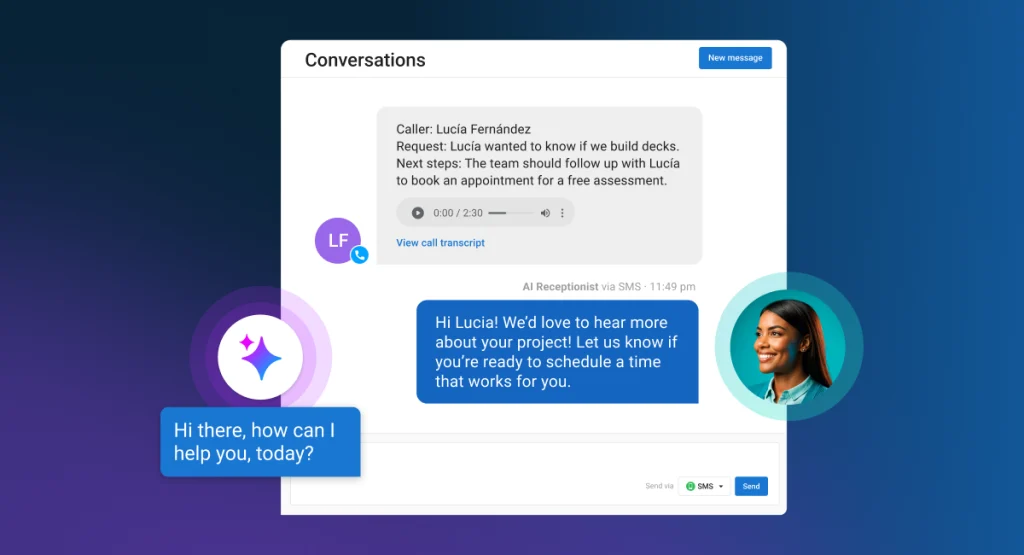
What Conversations AI does
Calls, texts, and web chats answered on the first ring, day or night, in most major languages.
Voice, SMS, web chat, email, and social messages land in a single thread per customer.
Contact details flow straight into your CRM, scored and ready for follow-up.

No missed calls. No lost leads.
- Missed-call text-back that re-engages the caller in seconds
- Instant replies to web chat and email inquiries
- Booking links and follow-ups sent automatically
- Smart handoff to your team when a human is needed
What is an AI receptionist?
An AI receptionist answers your incoming calls and messages on the first ring, at any hour, without a person on shift. It greets the caller, answers questions about your business, collects their name and number, books an appointment where you allow it, and logs the whole exchange against a contact record.
Conversations AI is our version. It is not a phone menu and it is not a scripted chat widget. It holds a conversation, works from what you have taught it about your business, and hands off to a person when the situation calls for one.
The reason this matters is arithmetic. Most inquiries to a small business arrive outside the hours somebody is free to answer them, and a caller who reaches voicemail usually calls the next business on the list instead of leaving a message. Answering first is often the whole competitive advantage.
Which channels can Conversations AI answer?
Phone calls, web chat, SMS, WhatsApp, email, and direct messages on Facebook and Instagram. All of them land in one shared inbox, threaded per customer, so a person who called on Tuesday and texted on Thursday appears as one conversation rather than two strangers.
The channels are split across tiers, and it is worth knowing which before you buy. Web chat, WhatsApp, Facebook, Instagram and email are covered from the entry tier. SMS with a local number and missed-call text-back sit on the middle tier and are available in the United States and Canada. AI voice — actually answering the phone — is the top tier.
One limit stated plainly: on Facebook and Instagram the AI handles direct messages, not comments left on your posts. It also needs a Facebook Page or a Business Instagram account rather than a personal profile.
Can it actually book appointments, or only take messages?
It books. Given access to your availability, Conversations AI offers real times, confirms the one the customer picks, and writes the booking and the contact into your CRM. It is not limited to capturing a name and promising a callback.
Appointment booking and lead capture work through chat from the entry tier. Booking during a phone call requires the voice tier, because the AI has to be answering the call in the first place.
This is the difference that shows up in revenue. A captured lead still needs somebody to chase it. A booked appointment is already on the calendar, and it was booked at eleven at night while you were asleep.
What happens when the AI cannot help?
It hands the conversation to your team, in the same thread, with everything said so far already written down. Nobody has to ask the customer to start again.
You decide where that line sits. The AI can be told to escalate on particular topics, when a caller asks for a person, or when it is not confident enough to answer. Your team can also step into any live conversation from the shared inbox at any moment, tag it, assign it, and leave internal comments that the customer never sees.
We would rather set the escalation threshold conservatively at first and relax it once you have read a few weeks of real transcripts. An AI that hands over slightly too often costs you a little time. One that improvises on a question it should not have touched costs you a customer.
Can I teach it about my business?
Yes, and this is the part that separates a useful deployment from a frustrating one. Out of the box the AI knows your hours, location and services from your business profile. You then load it with the rest: FAQs, pricing rules, what you do and explicitly do not offer, how you want appointments booked, and the tone you want it to use.
Beyond answering, Custom Capabilities let it act. A capability pairs a written instruction with a call to an external system, so the AI can do things like check whether something is in stock, look up an order status, or read live availability before it offers a time — then give the real answer rather than a generic one.
The practical advice: write down the ten questions you are asked most and the five you never want a machine answering. That document is most of the configuration, and it is the same exercise we recommend before delegating any work to AI.
Does it answer the phone, or only messages?
Both, but voice is the top tier and it has a usage allowance rather than being unlimited. The voice tier includes a set number of AI-answered minutes each month, with individual calls capped at ten minutes, and you can choose the voice it uses.
If your inquiries mostly arrive as web chat and social messages, the entry tier already covers you. If you are a service business where the phone is the front door and every missed call is a lost job, voice is the reason to be here at all.
Below the voice tier, missed-call text-back covers a good deal of the same ground: a call you could not take triggers an immediate text to the caller, and the conversation continues by message instead of ending in voicemail.
What does Conversations AI cost?
Three tiers, priced by what you need it to answer rather than by how many people are on your team. The entry tier covers web chat, WhatsApp, Facebook, Instagram and email. The middle tier adds SMS from a local number and missed-call text-back. The top tier adds AI voice answering with an included minute allowance.
We quote after a short conversation instead of publishing a price list, because the tier that fits depends almost entirely on how your customers currently reach you — and because the honest recommendation is often the cheaper tier.
Worth asking about on the call: SMS is available in the United States and Canada, and the system assigns a local number where one exists in your area.
Is an AI receptionist right for my business?
It fits best where inquiries arrive at inconvenient times and go cold quickly. Home services, trades, clinics, salons, repair shops, professional services — anywhere a customer with a problem is phoning three businesses and hiring whichever one picks up.
It fits less well where every inquiry needs judgment from the first sentence: complex custom quoting, regulated advice, or anything where a wrong answer creates real liability. In those cases the useful configuration is a narrow one — let the AI capture the lead and book the consultation, and let a person do the rest.
There is a version of this that goes badly, which is turning it on, pointing it at nothing, and letting it guess. We have written about why generic chatbots fail, and the failure is almost always configuration rather than the technology.
How do we start?
A short call, then a setup session. We connect the channels you actually use, load your business knowledge, agree the escalation rules, and put the web chat on your site — either with a snippet or the WordPress plugin if that is what your site runs on.
Conversations AI is one of five products in the Business Platform, and it pairs directly with CRM AI: Conversations captures the lead and books the appointment, CRM AI keeps the record current afterwards without anybody typing. If you would rather the whole system was built and run for you, that is what our AI Solutions engagements cover. Either way, book a call.
How is this different from a chatbot or an answering service?
A website chatbot follows a script and gives up when the visitor phrases something unexpectedly. A human answering service takes a message accurately and does nothing else — it cannot see your calendar, cannot answer a question about your pricing, and hands you a callback list every morning.
Conversations AI sits where those two fail: it holds an actual conversation, works from knowledge you gave it, takes an action at the end, and writes the result into your records. The comparison below reflects how these options typically work as of August 2026.
| What happens when a customer gets in touch | Conversations AI | A website chatbot or an answering service |
|---|---|---|
| Answers outside business hours | Yes, every channel, including voice on the top tier | Chatbot yes; answering service depends on the plan you bought |
| Handles a question phrased unexpectedly | Holds a real conversation and works from your knowledge base | Chatbot falls back to a menu; a human operator takes a message |
| Answers questions about your pricing and services | Yes, from the information you loaded | Chatbot only if somebody scripted that exact answer |
| Books an appointment on your calendar | Yes, offers real times and confirms the booking | Rarely; usually captures a request for a callback |
| Covers phone, chat, SMS, WhatsApp, email and social | One shared inbox, threaded per customer | Separate tools, separate logins, separate histories |
| Writes the contact and the transcript into your CRM | Automatically, on every conversation | Manual re-entry from a message log |
| Escalates to a person | On your rules, in the same thread, with full context | Chatbot dead-ends; operator takes a message and hangs up |
| What it costs to extend the hours | Tier upgrade, not a headcount decision | Answering service bills per call or per minute |
AI receptionist: common questions
Will customers know they are talking to an AI?
That is your call, and we recommend being straightforward about it. Conversations AI can introduce itself as an assistant, and in practice customers mind far less than owners expect — what annoys people is waiting, not being helped quickly by software.
What does damage trust is a machine pretending to be a named member of staff and then being caught out. Set the greeting so it is honest, and let the quality of the answers do the rest.
Can Conversations AI reply in other languages?
Yes. It handles multilingual conversations and is built to cope with a range of accents, so a customer who is more comfortable in another language gets a proper answer rather than a dead end.
Replies stay consistent with the business knowledge you loaded regardless of the language the customer opens in.
Do I get a new phone number, or can it use mine?
On the SMS tier the system assigns a number automatically, and it will try to give you a local one based on your business address. If no local number is free, you get one from a neighboring area, and a toll-free number can be arranged through support if that suits you better.
SMS is currently available to businesses in the United States and Canada. Everywhere else, web chat, email, WhatsApp, Facebook and Instagram are the channels available.
Can it reply to comments on my Facebook and Instagram posts?
No. On Facebook and Instagram it handles direct messages only, not public comments left under your posts. You also need a Facebook Page or a Business Instagram account — a personal profile cannot be connected.
If replying to public comments at scale is the problem you are trying to solve, that belongs to Social AI rather than to this product.
How does the web chat get onto my website?
Either a small snippet of code added to your site, or a WordPress plugin if your site runs on WordPress. Any site where you can add custom code will work.
If we built your site, we install it for you and check it renders properly on mobile, which is where most chat conversations actually start.
Ready to put Conversations AI to work?