Get more reviews. Respond to all of them.
Reputation AI requests reviews automatically at the right moment, then drafts and posts on-brand replies across Google, Facebook, and more — from one dashboard.
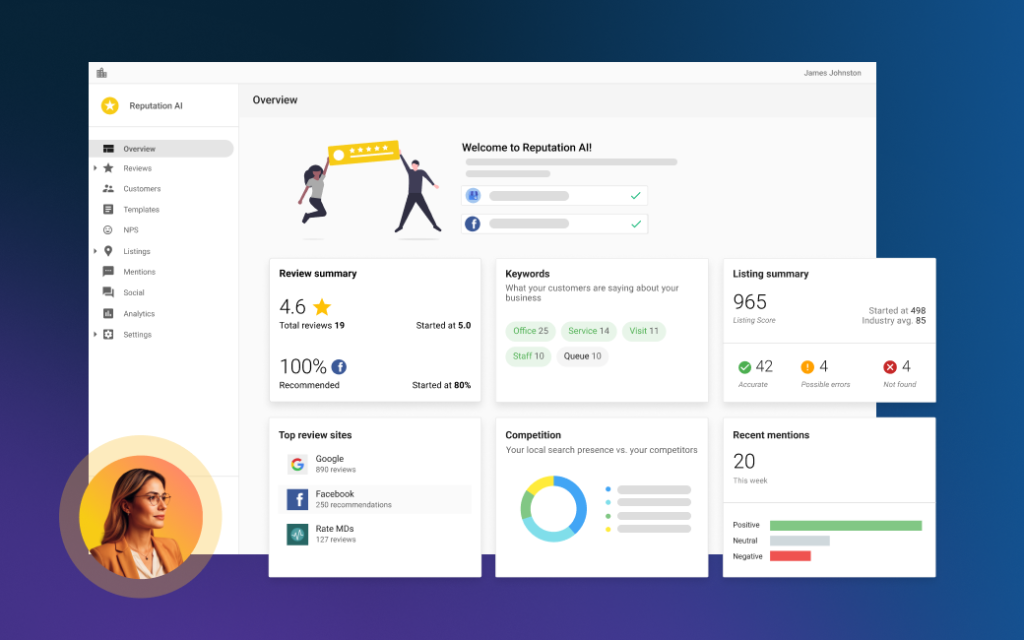
What Reputation AI does
Ask every customer for a review by text and email the moment a job is finished, when they are most likely to respond.
AI drafts responses in your voice for reviews across Google, Facebook, and 100+ sources.
See every rating and review across platforms in one place, and track sentiment over time.
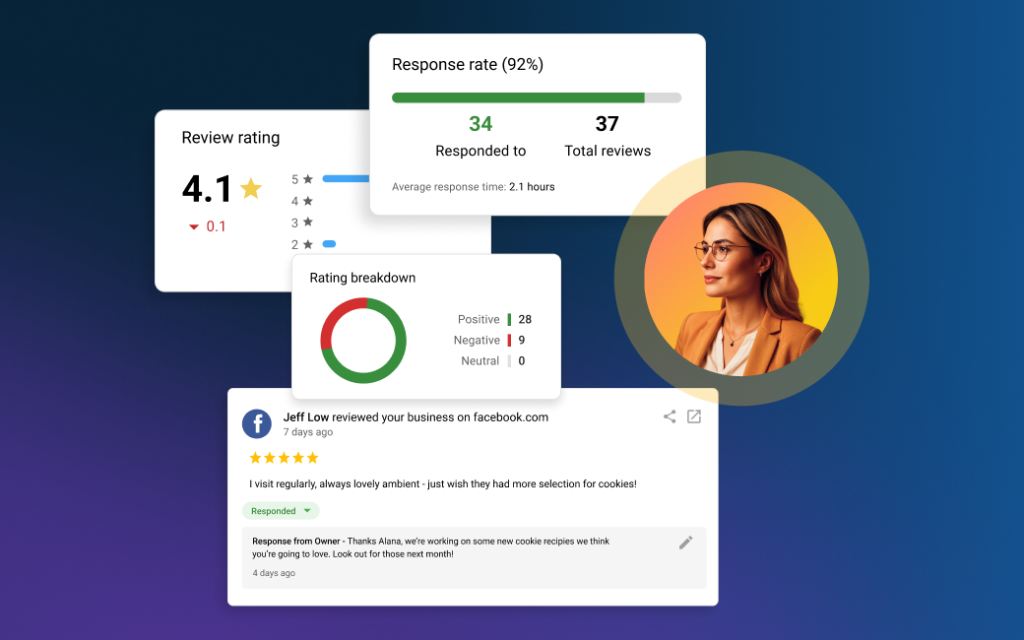
Build trust while you focus on the work.
- Automated review requests by text and email
- AI-drafted, on-brand replies you can approve or auto-post
- Monitoring across Google, Facebook, Yelp, and more
- Rating-threshold rules and sentiment insights you control
What is AI reputation management?
AI reputation management is software that asks your customers for reviews automatically, writes and posts the replies, and watches every site those reviews land on. The AI handles the volume; you keep the judgment calls and the rules.
Reputation AI does three separate jobs that are usually three separate chores. It sends review requests by text and email after a job is finished. It drafts on-brand replies to reviews as they arrive and, where you allow it, posts them without waiting for you. And it monitors ratings, mentions and sentiment across the sites your customers actually read, so a problem surfaces while you can still do something about it.
The reason this is worth automating is that reputation work is not hard, it is relentless. One unanswered week is invisible. Six unanswered months look like a business that has stopped caring.
How do you get more reviews without nagging customers?
By asking once, quickly, on the channel they already use. Reputation AI sends the request by email or SMS at the moment the job is done — the point where the experience is fresh and the customer is most willing — and does not chase people who have already replied.
It can trigger the request straight from the systems you already work in. Integrations with tools like QuickBooks Online, Jobber and PetExec let a completed invoice or a closed job send the request on its own, so nobody has to remember.
Timing beats persuasion here by a wide margin. A request sent an hour after the work finished outperforms a beautifully written one sent a two weeks later, and it does not make you look desperate.
Do you only ask happy customers for reviews?
No, and you should be wary of any tool that offers to. Selectively soliciting reviews from customers you expect to be positive is review gating, and it is against Google's review policies. Getting caught costs you far more than a handful of four-star reviews ever would.
What Reputation AI does instead is separate two things that are often confused. Review requests go to customers, without filtering by predicted sentiment. Net Promoter Score surveys are a private feedback channel that runs alongside them, so you learn a customer was unhappy directly rather than discovering it in public a week later.
That distinction matters commercially as well as ethically. A private complaint you resolve is a retained customer. The same complaint posted publicly is a permanent listing you can only reply to.
Does the AI reply to reviews automatically, or do I approve them first?
Either, and you set the rule. The AI Reputation Specialist can post replies to Google and Facebook on its own, or draft them and wait for a person to publish. Most businesses run a mix.
The controls are specific rather than a single on/off switch. You choose which platforms it posts to, a rating threshold above which it may act alone, and a delay before it replies so a review does not get answered within nine seconds of being written. Replies match the language the review was written in.
The configuration we usually recommend to start: let it post automatically on four- and five-star reviews, and route everything below that to a person. Positive reviews are where the volume and the tedium sit; low-rated ones are where the judgment is, and they deserve two minutes of your attention.
How does it handle a negative review?
By default it does not handle one alone — it drafts, and you decide. That is a deliberate default rather than a limitation, because a reply to an angry customer is a public document that a hundred future customers will read.
Where the AI genuinely helps is preparation. It gives you a reply that is calm, on-brand and already written, so the job becomes editing rather than composing something while irritated. It also flags the review immediately, which matters more than the wording — a complaint answered within a day reads very differently from the same words posted three weeks later.
It also tracks review edits, so when a customer quietly revises a one-star to a four-star after you resolved their problem, you find out.
Which review sites does it cover?
Fully automated replies run on Google and Facebook. Beyond those two, it monitors and drafts suggested responses for reviews from more than a hundred additional sources, and the list is deliberately industry-wide rather than generic.
That includes the general sites everybody knows — Yelp, Better Business Bureau, Trustpilot, TripAdvisor — and the ones that quietly decide purchases in particular trades: Houzz, Angi and Zillow for home and property, Healthgrades, Vitals and Zocdoc for clinics, Cars.com, CarGurus, DealerRater and Carfax for automotive, OpenTable, Grubhub and Booking.com for hospitality, Apartments.com and ApartmentRatings for property management.
Everything lands in one dashboard with ratings, mentions and sentiment together, plus monitoring of up to three competitors so you can see whether a dip is you or the whole category.
Can it tell me what customers actually keep saying?
Yes, and this is the part owners underuse. You can chat with the AI about your own review and survey data — ask what people complain about most, whether sentiment moved after you changed something, or which location is drifting — and get an answer without reading three hundred reviews yourself.
It surfaces recurring themes, early warning signs, and the specific things customers name when they are happy. That last one is genuinely valuable and rarely acted on: the phrase your customers keep using about you is usually better marketing copy than anything you would write.
Those themes also feed your search visibility, because the language real customers use is the language other people type into Google.
What does Reputation AI cost?
A monthly subscription, quoted after a short conversation rather than from a price list. Everything on this page is included: automated review requests by email and SMS, AI replies posted to Google and Facebook under your rules, coverage of 100+ review sites, NPS surveys, competitor and mention monitoring, the website widget, and the integrations that trigger requests from your job or invoicing system.
We quote after looking at where you currently stand, because a business with two hundred existing reviews and one with none need very different amounts of work in the first month even though the software is the same.
How do we start?
A short call and an audit of where you currently stand. We look at your review counts and ratings across the sites that matter in your trade, check your listings actually point at the right business, and agree the response rules before anything is switched on.
Reputation AI is one of five products in the Business Platform. It works closely with SEO AI, because reviews and accurate listings are the two biggest inputs into whether you appear in the local map results at all, and the review requests themselves run off contact records in CRM AI. If you would rather we ran the whole program for you, that sits under our agency services. Either way, book a call.
How is this different from asking for reviews yourself?
Mostly in what survives contact with a busy week. Asking manually works well for about a two weeks, then a big job lands and nobody sends a request for a month. The replies go the same way — the five-star ones feel optional, so they get skipped, and an unreplied review is a small missed signal to both customers and search engines.
The other difference is coverage. Doing it yourself realistically means Google, possibly Facebook, and nothing else, because nobody is logging into eleven review sites a week to check. The comparison below sets out how the three usual approaches differ as of August 2026.
| The job | Reputation AI | Handling it yourself, or with a review widget |
|---|---|---|
| Asking every customer for a review | Automatic by email and SMS when the job closes | Manual, and the first thing dropped in a busy week |
| Triggering requests from your job or invoicing system | Built-in integrations do it without anyone remembering | Not realistic without exporting a spreadsheet |
| Replying to reviews | AI drafts every one, and posts on rules you set | Realistically the recent ones, when there is time |
| Reply speed on a complaint | Flagged immediately, with a draft ready to edit | However long it takes somebody to notice |
| Sites monitored | Google, Facebook and 100+ more in one dashboard | Google, and possibly Facebook |
| Private feedback before it becomes public | NPS surveys running alongside review requests | Only if you phone people and ask |
| Spotting themes across hundreds of reviews | Ask the AI and get an answer back | Read them all, or go on impressions |
| Watching competitors | Up to three tracked automatically | Occasional manual checking |
| Showing reviews on your website | Customizable widget, kept current automatically | Copy and paste, then it goes stale |
Review management: common questions
Can I stop the AI from replying to certain reviews?
Yes. You set a rating threshold below which it never posts on its own, choose which platforms it is allowed to touch, and can require manual approval for anything you want a person to see first. Nothing is all-or-nothing.
You can also set a delay before it replies. A response that appears seconds after a review was written reads as automated no matter how well it is worded, and a short wait fixes that entirely.
Will the replies sound like a robot wrote them?
Not if it is set up properly. You load the AI with your own response templates, tone guidance and business knowledge, and it writes from that rather than from a generic script. It also matches the language the review was written in.
We read the first few weeks of replies with you and adjust. The failure mode is not bad grammar, it is replies that are all subtly identical, and that is fixed by giving it more of your own material to work from.
What happens to my review data?
It stays in your account and is used only to generate your own replies and insights. Your reviews, tone guidelines and business knowledge are not shared outside it.
If you leave, the reviews themselves are not affected — they live on Google, Facebook and the other platforms, which is where they always were. What you lose is the monitoring and the automation, not the reviews.
Does it work if I have several locations?
Yes. Multi-location reporting rolls up NPS, request performance and reputation trends across every site, so you can compare locations against each other rather than reading ten separate dashboards.
That comparison is usually the most useful output. When one location’s rating drifts while the others hold steady, the cause is local and fixable, and you find out in weeks rather than at the end of the year.
How long before more reviews start showing up?
Within the first month, provided you are finishing jobs. Review volume is mostly a function of how many people are asked and how quickly, so businesses that were never asking systematically tend to see the sharpest change.
Ratings move more slowly than counts. A long-standing average takes a while to shift, because each new review is one data point among all the old ones — but the recency of your reviews starts working for you immediately.
Ready to put Reputation AI to work?